
Getting started
Magento: a LIKYLY module written for you, and a model that learns from every order
The setting for this article: a Magento Open Source 2.4.9 store, the “LIKYLY Test Shop”, with 120 products, 20 of them luxury dresses. To bring it to life, 45 test shoppers with clear-cut tastes (15 for evening gowns, 15 for cocktail dresses, 15 for day dresses) signed in with a real browser, looked at dresses, followed a recommendation, filled their cart and placed orders. Everything that follows is real: the wizard’s output, what the module sent, the console, and the relevance of the recommendations measured at four points in the model’s life.
Comparing two products, or knowing which one to show to whom
An AI assistant like ChatGPT or Claude compares two dresses very well if you ask it to: cut, fabric, price, occasion. But it compares products with each other, based on their description. It does not know that Camille bought two evening gowns last month, that Louise only looks at day dresses, or what the shoppers who hesitated over the same product page ended up buying. It sees neither your traffic nor your orders, and no one tells it whether its suggestion was bought.
A recommendation engine does the opposite: it answers no questions; on every page view it decides which products to show to that particular shopper, based on what your store has learned, then it measures the result and retrains its model. LIKYLY also relies on AI to understand product pages (semantic embeddings), but what makes the difference is collaborative filtering learned from your own customers. The end of the article shows what that changes, with figures to back it up.
Step 1: the wizard writes a Magento module
At the root of the store, one command: npx @likyly/wizard. It recognizes Magento from its composer.json and does not go through Composer: it writes a small module in app/code.
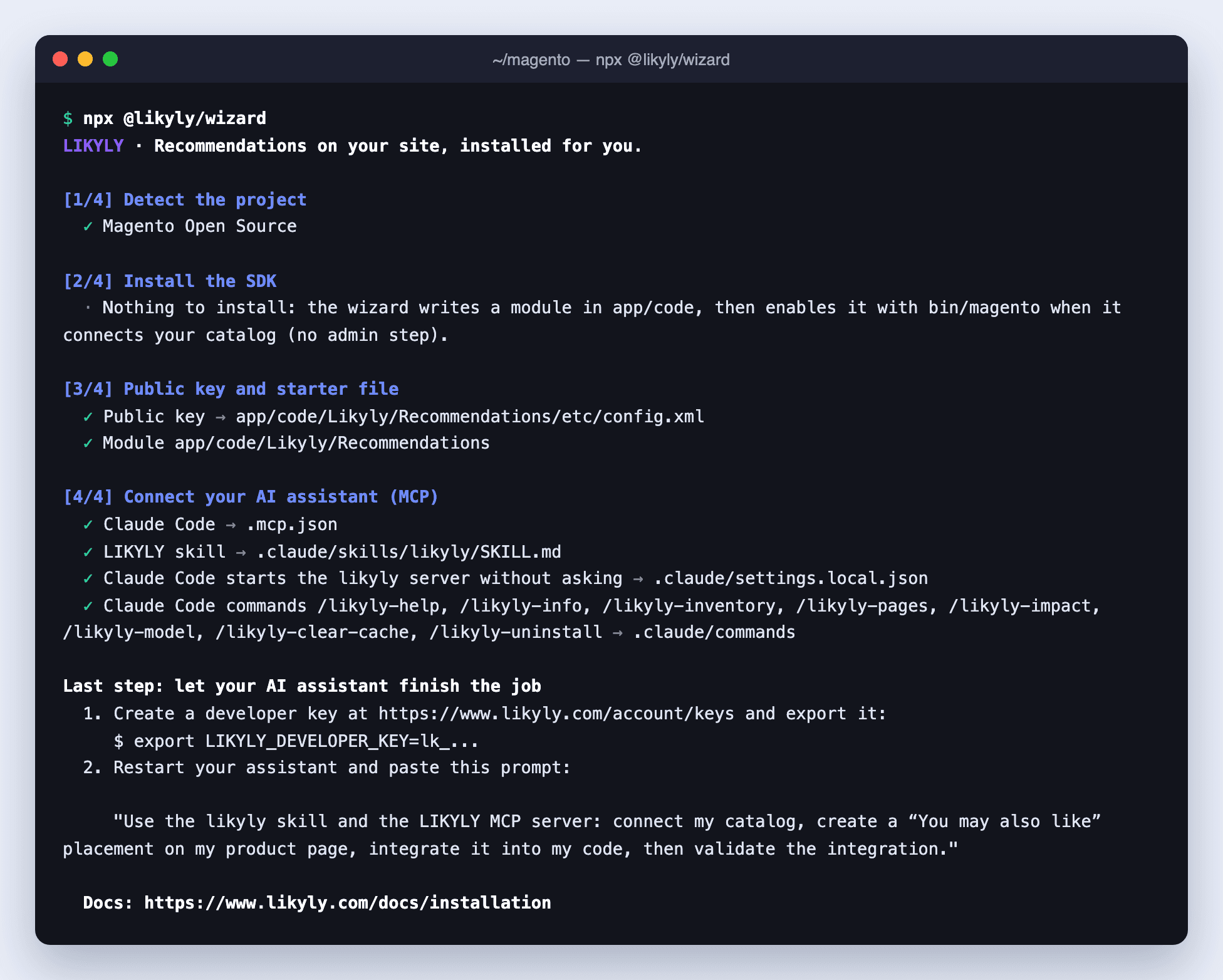
@likyly/wizard 0.18.1 in non-interactive mode (--yes) on a copy of the store. In normal mode, it signs you in to likyly.com, then connects the catalog.app/code/Likyly/Recommendations/
Block/ view/ # the block and its template (SDK loaded from jsDelivr)
CustomerData/ # the signed-in customer, for a history that follows them
Console/ # bin/magento likyly:integration, likyly:catalog
etc/config.xml # the public keyThe module tracks every page: the signed-in customer, every add to cart, and every purchase on the order confirmation page, with its price and the recommendation it came from. It also adds a widget (Content → Widgets → LIKYLY recommendations) and settings (Stores → Configuration → Catalog → LIKYLY).
To connect the catalog, there is nothing to do in the admin. The wizard figures out how bin/magento runs in your project (DDEV, Warden, Docker Compose or PHP directly), enables the module, then creates a read-only “LIKYLY” Integration (catalog, stores, stock). Its credentials are sent to LIKYLY, encrypted, without ever being displayed. LIKYLY then reads the products through the store’s REST API, with signed requests. A store on your own machine, out of reach of the internet, is sent by the wizard itself. A store in production mode is left untouched: there, a module requires a full deployment.
Step 2: Claude Code places the blocks
The wizard hands over to Claude Code (the handover in detail). With the LIKYLY MCP server, Claude creates the placements, adds one layout file per page to the module, then flushes the Magento cache:
app/code/Likyly/Recommendations/view/frontend/layout/
  catalog_product_view.xml   # "You may also like" under the description
  cms_index_index.xml        # "Recommended for you" on the home page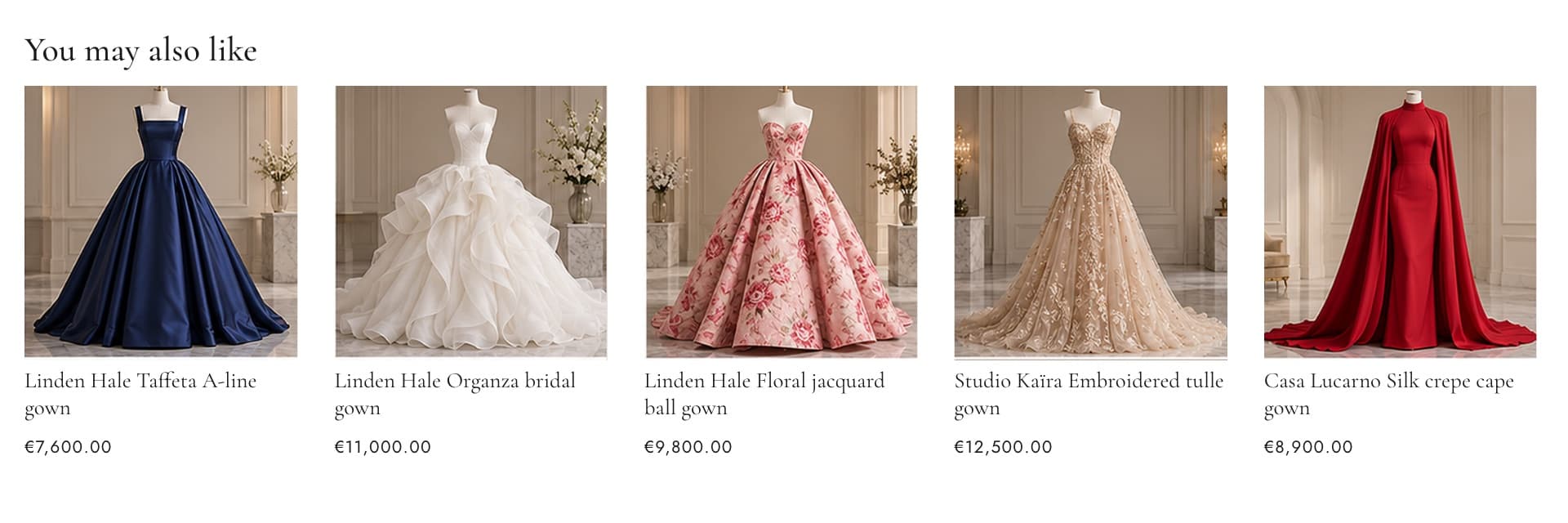
Step 3: two shoppers, two home pages
On the home page, the “Recommended for you” block does not depend on a product page: it relies only on what LIKYLY knows about the signed-in shopper. Here is the same block, at the same moment, for two test shoppers. Camille ordered evening gowns, Louise day dresses.
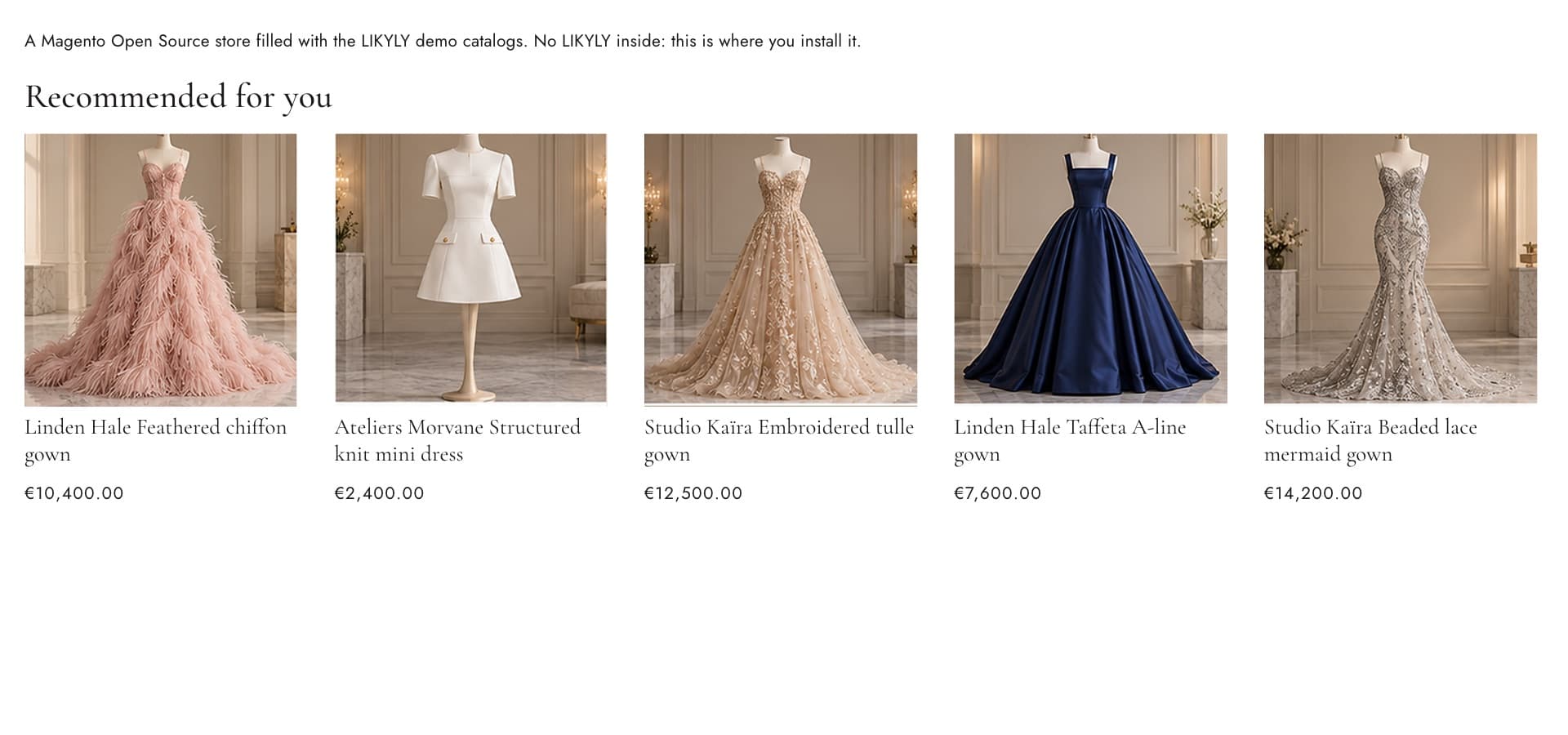
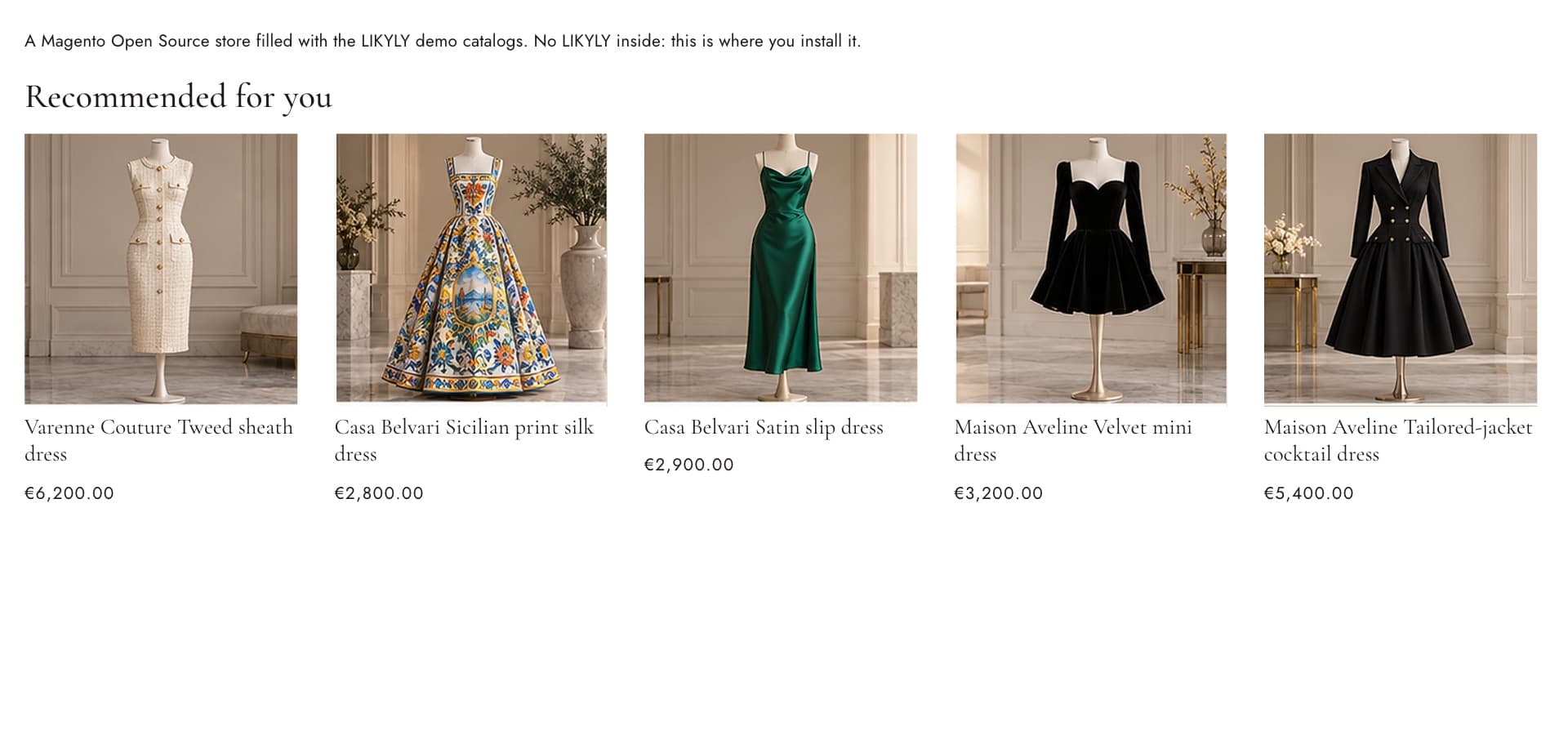
No rule was written to get this. No one tagged the shoppers or told the engine what an “evening gown” is: the model inferred it from views, carts and orders. And a dress already bought is never recommended again to a signed-in shopper: that rule is on by default.
Step 4: what the module sends, from view to purchase
The journey of Mila, one of the test shoppers, as logged by the test script:
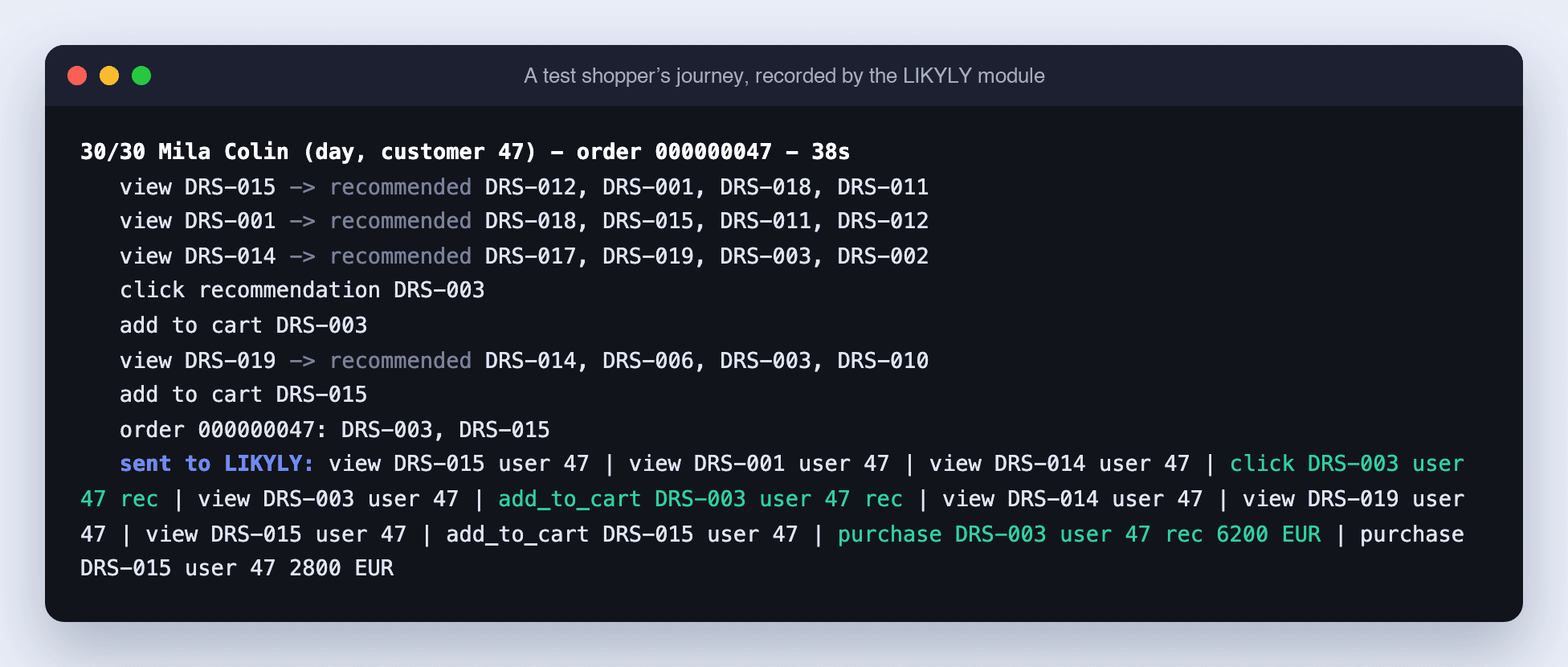
rec tag. Dress DRS-003, clicked in a block, counts toward attributed revenue; DRS-015, found on her own, does not.This chain is what lets you say what recommendations bring in, and nothing more: a purchase is attributed only if the product was clicked in a block.
Step 5: the Pro console
The Performance page brings together the eight metrics, the day-by-day chart, the funnel from product viewed to purchase, each placement’s share of revenue and the ten products that perform best as recommendations, with a CSV export.
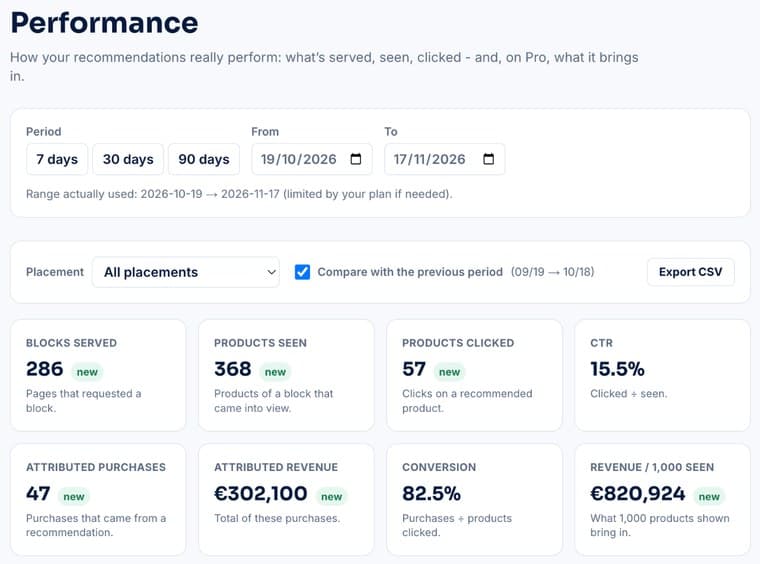
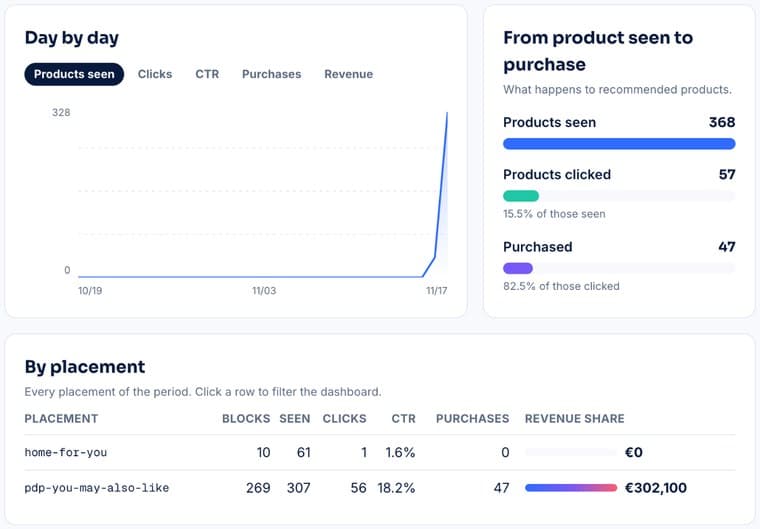
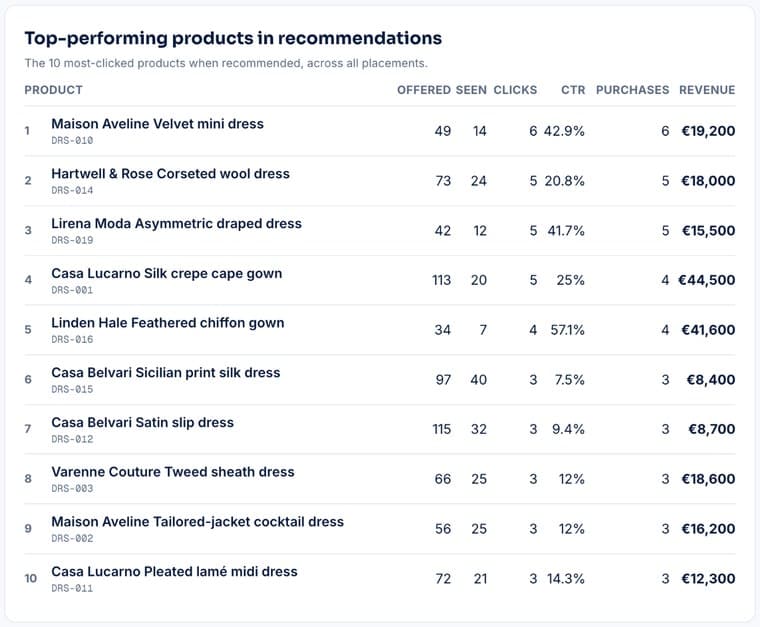
An honest word about these figures: the test shoppers follow a recommendation by design, and the dresses cost several thousand euros. The conversion rates and revenue show what the console can measure, not what a real store would get.
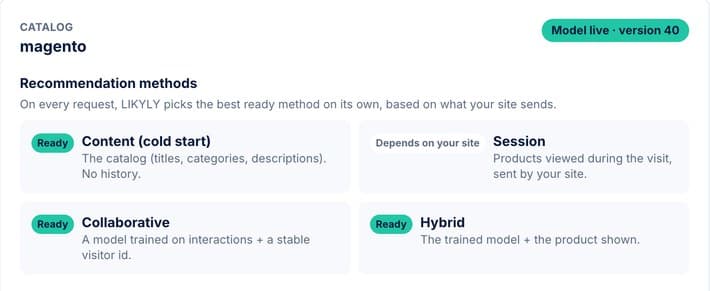
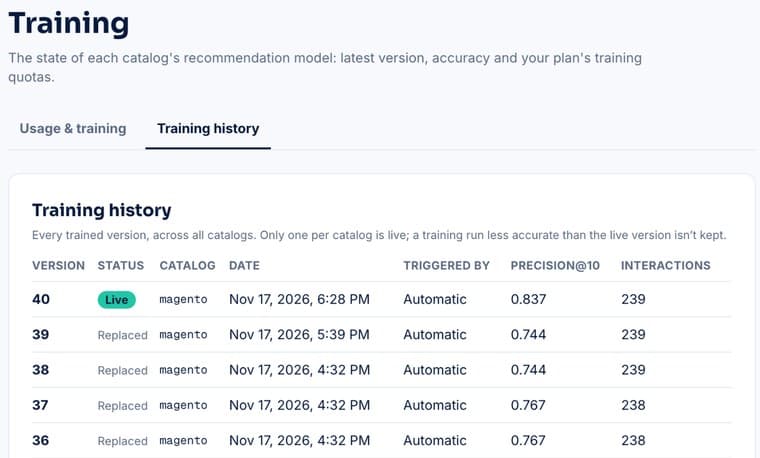
The Training page tells which recommendation methods are ready, and shows each version of the model: when it was trained, on how many interactions, and its precision.
More data, more relevant products: the measurement
Do recommendations really get better as the store accumulates data? In this sandbox, we can check, because we know each shopper’s taste. At four points in time, a script read what LIKYLY would recommend to each of them on the home page (through the placement preview, which writes nothing and counts in no statistics), then scored the share of recommended dresses that are to her taste and not yet bought: the only ones that can still lead to a sale.
19 interactions, precision@10 of 0.20 · 15 shoppers measured
89 interactions, precision@10 of 0.54 · 15 shoppers measured
155 interactions, precision@10 of 0.83 · 45 shoppers measured
239 interactions, precision@10 of 0.84 · 45 shoppers measured
Random: 20 %Best possible: 75 %
At random, four dresses drawn from the twenty would give 20% useful dresses. The best possible is 75% on average, not 100%: a “day dresses” shopper has only four dresses to her taste in the catalog, two of them already bought. With a model trained on 4 shoppers, LIKYLY does barely better than chance. With 30, it reaches 67%: close to the ceiling. With 46, it stays at 66%: for this department, the home page has gained all it could. For comparison, a visitor we know nothing about gets the most popular dresses: 10% then 16% useful dresses in the last two measurements, below chance, because popularity ignores tastes.
The breakdown by taste, with the latest model (46 shoppers):
| Taste | Useful recommendations | Best possible | Random |
|---|---|---|---|
| Evening gowns (15 shoppers) | 78% | 100% | 35% |
| Cocktail dresses (15 shoppers) | 70% | 75% | 15% |
| Day dresses (15 shoppers) | 50% | 50% | 10% |
Day dresses reach their ceiling, and they are the rarest taste in the catalog: at random, a shopper would see only one in ten. That is exactly where an engine that knows its shoppers makes the biggest difference.
How to read these figures
The theory behind these bars comes down to three ideas. First, every interaction is a vote: a view weighs little, an add to cart more, a purchase the most. The model, a matrix factorization, places shoppers and dresses in the same space of tastes. With 19 interactions, that space is nearly empty and the engine falls back on the current session; with 155 then 239, the three taste groups are clear.
Next, the curve rises fast, then levels off. The gain comes over the first few dozen shoppers; after that it is capped by the catalog, as the day dresses show. In a real store, the ceiling also depends on how much of the buying is unpredictable, a larger share than with test shoppers with clear-cut tastes.
Finally, not all placements react the same way. On the product page of a wedding dress, which is no one’s taste, the share of useful dresses went from 25% to 43%, stayed at 43% between 16 and 30 shoppers, then reached 58% with 46 shoppers, just when the home page had stopped moving. This block starts from the product displayed and blends in only part of the shopper’s profile: it needs more data for that profile to carry weight. That is by design: on a product page, you first show what looks like what the shopper is viewing. The practical consequence: additional data keeps paying off after one placement has hit its ceiling, by improving the others.
Under the hood, LIKYLY retrains the model when enough new interactions have come in (up to 5 times a day on Pro, once on Free), measures its precision on a held-out part of the data, and puts a new version in production only if it does at least as well as the current one on the same data. The precision@10 shown is only comparable on equal data; what matters to your customers is the share of useful products they see, and that is what the study above measures.
The limits of this test
- Simulated shoppers with clear-cut tastes, and a department of 20 dresses: a textbook case, sharper than reality.
- A few dozen orders: enough to see the trend, not to draw an average from it.
- The purchases follow a recommendation by design: attributed revenue shows the attribution, not a business result.
What carries over is the mechanism: the more views, carts and orders your store sends, with its signed-in customers identified, the closer the products shown get to what each person will buy. The Shopify version of this walkthrough is in the Shopify article. To get started on your store: the installation guide, or npx @likyly/wizard at its root.